Wednesday, August 10, 2011

Mozilla Thunderbird 6.0 Beta 3 / 5.0

Recovery


Email client with tabs, great search, and email archiving

Mozilla Thunderbird is an open-source and cross-platform mail client and news reader for most modern operating systems including, but not limited to Windows, Macintosh and Linux.

It offers some advantages over other mail clients, including junk mail classification. Built from Mozilla code, Mozilla Thunderbird uses Gecko, the most standards-compliant rendering engine in existence.

In addition to the feature set found in Mozilla Mail, Thunderbird has several new features and improvements to make your mail and new experience better.

Note: You must delete your old Mozilla Thunderbird directory rather than just overwriting the files there. Not doing so WILL result in problems and you should not file any bugs on Mozilla Thunderbird unless you've first done a clean install.

Here are some key features of "Mozilla Thunderbird":

Full-Featured Email:
· Simple to use, powerful, and customizable, Thunderbird is a full-featured email application. Thunderbird supports IMAP and POP mail protocols, as well as HTML mail formatting. Easily import your existing email accounts and messages. Built-in RSS capabilities, powerful quick search, spell check as you type, global inbox, deleting attachments and advanced message filtering round out Thunderbird's modern feature set.

Junk Mail Filters:
· Each email you receive passes through Thunderbird's leading-edge junk mail filters. Each time you mark messages as spam, Thunderbird improves its filtering so you can spend more time reading the mail that matters. Thunderbird will also use your mail provider's spam filters to keep junk mail out of your inbox.

Anti-Phishing Protection:
· Thunderbird protects you from increasingly common email scams "also known as “phishing” which try to fool you into handing over your passwords and other personal information. Thunderbird will tell you when it thinks a message might be a scam.

Advanced Security:
· Thunderbird provides enterprise and government grade security features including S/MIME, digital signing, message encryption, support for certificates and security devices. Attachments are never run without your express permission, protecting you from many worms and viruses.

Automatic Updates:
· The new Software Update feature makes it easy to get the latest security and feature updates to Thunderbird. Thunderbird automatically downloads these small updates in the background and prompts you when they are ready to be installed.

Customize Thunderbird:
· Select new button controls for your toolbars, install extensions to add new features, or change the look of your browser with themes the way Thunderbird looks and works is under your control.

Requirements:

· Pentium 233 MHz (Recommended: Pentium 500MHz or greater)
· Windows 7, Windows Vista, Windows XP: 786 MB RAM (Recommended: 1GB RAM or greater)
· Windows 2000: 256 MB RAM (Recommended: 512 MB RAM or greater)
· 52 MB hard drive space

What's New in This Release:

· More responsive and faster to start up and use
· Thunderbird is based on the new Mozilla Gecko 5 engine
· New Add-ons Manager
· Revised account creation wizard to improve email setup
· New Troubleshooting Information page
· Tabs can now be reordered and dragged to different windows
· Attachment sizes now displayed along with attachments
· Plugins can now be loaded in RSS feeds by default
· There are several theme fixes for Windows Vista and Windows 7
· Over 390 platform fixes that improve speed, performance, stability and security


Program Informations
 Developer: Mozilla Foundation.for
more visit free software


Size,Price and Added Date
14.5MB.Freeware.$0.00 to buy
10-08-2011


Download Links
Mozilla Thunderbird 6.0 Beta 3 / 5.0.
Search here for more apps

Dropbox 1.2.24 Experimental / 1.1.35

Recovery


Store, Sync, and Share your files online

Dropbox is a useful tol that will enable you to instantly store your files online and share them. It can also synchronize the files from your offline directories and online storage.

Here are some key features of "Dropbox":

Synchronization:
· Once installed, any file you drop into your Dropbox folder will synchronize and be available on any other computer you've installed Dropbox on, as well as from the web. Also, any changes you make to files in your Dropbox will sync to your other computers, instantly.

Backup:
· Let's say you accidentally delete that 8 page report that you were supposed to have for a meeting tomorrow. A handy Dropbox feature is the ability to undelete files or pull up any previous versions of it.

Sharing:
· You can also share files and folders with whomever you choose, whether it be music with buddies, docs with colleagues or photos with grandma, even if they're not Dropbox users.

Speed:
· We obsess over speed, and it shows. Dropbox is very smart about the way it handles files. For example, if you make a change to a huge file, dropbox will only update the piece of the file that changed.

Security:
· All files are transported over SSL and encrypted using AES-256 (banks use this too).

Requirements:

· At least 512 MB of RAM
· Free space on your computer equal to your Dropbox storage quota.

What's New in This Release:

· Fix "stack misalignment error" in 1.2.23
· Fix Finder crash that would happen during network settings or scrolling in list view


Program Informations
 Developer: Dropbox.for
more visit free software


Size,Price and Added Date
14.4MB.Freeware.$0.00 to buy
10-08-2011


Download Links
Dropbox 1.2.24 Experimental / 1.1.35.
Search here for more apps

SWiSHmax 4.0 Build 2011.06.20

Recovery


This tool has everything you need to create stunning fully interactive Flash animations

SWiSHmax is a program that was developed to be the most powerful Flash creation utility. SWiSH Max is packed with features that make producing stunning interactive Flash animations a simple and painless experience.

SWiSH Max is easy to use and produces complex animations with text, images, graphics, video and sound. SWiSH Max has tools for creating lines, rectangles, ellipses, vector and freehand curves, motion paths, movie clips, rollover buttons, and input forms all in an intuitive easy-to-use interface.

SWiSH Max also includes a large range of preset multimedia effects, components and vector art.

Here are some key features of "SWiSHmax":

Multimedia Effects & Components:
· Advanced Flash design for the graphic artist or animation programmer. Full design control.
· Project Templates and Wizard Panel for quick publish of included projects.
· Bundled with over 380 built-in multimedia effects and a simple effects browser.
· Built-in effects make creating animations quick and easy using your videos, text, images, graphics or sounds.
· Effects can be applied to multiple objects.
· Supports multiple overlapping soundtracks with multiple sound effects.
· Choose from over 300 components and vector shapes, or add your own custom built components.
· Create and distribute your own special effects and components.
· Component Tool for fast and easy placement of common components.

Over 380 Built-In Multimedia Effects:
· SWiSH Max comes bundled with over 380 built-in multimedia effects that let you make fantastic animations with your video, text, images, graphics or sound. The Effects Browser lets you step through each effect to preview your animation - with so many effects the only problem is deciding which one to use! Includes over 40 pre-configured Filters.

Drag & Drop Components:
· Need a button, list, menu or preloader? Simply drag it onto the stage. Choose from over 380 SWiSH Max4 components and vector shapes, or make your own to simplify common tasks. Now including Autoshape components.

Drawing Tools:
· Type text directly on the stage and even give each character an individual attribute (bold, font, size etc.).
· Advanced drawing tools include: Line, Pencil, Pen, Text, Ellipse/Circle, Rectangle/Square, Perspective and AutoShapes.
· Keyboard short cuts are available for all the drawing tools.
· Complex Shape editing options make it easy to modify your shapes.
· Use AutoShapes to place arrows, stars, polygons and more.
· Guides, grids, and alignment tools.
· Knife tool and Shape Operations.
· Bezier curves for motion paths. Convert shapes to motion path.
· Transform shapes with morphing
· Filters and Blend Effects.

Advanced Drawing & Editing Tools:
· SWiSH Max comes complete with a set of professional quality drawing tools including Line, Pencil, Pen, Text, Elipse/Circle, Rectangle/Square and AutoShapes. Complex Shape editing options also make modifications simple.

Guides, Grids and Alignment Tools:
· Guide, grids and alignment tools make positioning your movies elements a breeze. You can simply snap to grids or guides to constrain the objects you are editing. Objects can also be aligned or spaced out evenly.

User Interface:
· A simple yet comprehensive interface puts all the tools within easy reach.
· Objects, frames and effects can all be added, modified or deleted directly from the timeline.
· Open multiple documents simultaneously to manage your large projects.
· Moveable panels can be hidden to clear your workspace.
· Preview all your work within SWiSH Max4, even playback at different internet speeds.
· Sharing resources between your Flash movies is a breeze with the content library and assets.
· Undo/Redo Panel shows the history of your actions.
· Advanced Find and Replace lists results in objects, script and labels.

Simple Yet Powerful:
· A simple, inuitive interface puts all the tools within easy reach. You'll be making stunning Flash animations in minutes.

Easy Content Management:
· Managing the objects used in your movies is simple with SWiSH Max's powerful content management features. You can easily share resources between your movies with the content library and assets.

Import & Export:
· Import SWF movies produced by any other Flash application.
· Import videos, sounds, graphics and text files.
· Paste Special offers a choice of import formats when transferring from other applications.
· SWiSH Max SWF movies can be imported into any other Flash application with ease.
· Advanced compression features help keep your SWF file sizes small.
· Exported HTML can use a custom template to include Javascript, CSS, PHP and more.
· Export straight to AVI, EXE, PNG or GIF animation.
· New SWF Export options.

Import Video, SWFs, Graphics, Sound & More:
· Import video, SWFs, sound, graphics and text files. SWiSH Max imports all the file types you are likely to need for your Flash animation including: TXT, BMP, DIB, GIF, JPG, IF, JPEG, PNG, WMF, EMF, SWF (both compressed and uncompressed), EXE (Flash Projector), WAV and MP3 files.

Advanced Export Control:
· You can easily export your SWF movies complete with HTML, AVI movies, PNG images, GIF animations and Flash Projectors. SWiSH Max's SWF movies can be imported into any other Flash application with ease. SWiSH Max also introduces a number of advanced compression features to help keep your SWF file sizes small.

Scripting:
· All interactivity can be added through a simple menu interface.
· Script editor allows advanced user to enter scripts directly.
· A debugger simplifies finding and fixing errors in your scripts.
· Syntax coloring, custom keywords and support for external script files.
· Print a selection, current script or all script.
· Improved script compiler supports #pragma and new language syntax.

Scripting Made Simple:
· All interactivity in your SWiSH Max movie can be added through a simple menu interface, so you have full coding capabilities by selecting the actions and events you need.

Powerful Script Editor and Debugger:
· SWiSH Max includes a script editor that has powerful features for both the beginner and advanced users. To help you find errors in your script SWiSH Max includes a powerful debugger.

Requirements:

· IBM or compatible Pentium/AMD processor (900 MHz or greater)
· 512 MB RAM or greater
· 1024 x 768, 16-bit display (32-bit recommended)
· Adobe Flash Player

Limitations:

· 15-day trial or 100 uses
· Nag screen

What's New in This Release:

· New: Find and Replace - Advanced Replace All selection only
· New: htmltemplate for full screen mode
· New: Electric ARC and Electric Text components
· New: Barcode component
· New: XMLdata handler
· New: Spectrum_L component
· New: Bargraph component
· New: Bounce component
· New: Printer icon
· New: Document shows as modified on loading
· New: Color transform tool
· New: Convert some jukebox players to wizards.
· New: Input text scroller
· New: Spectrum component
· New: Include java-querystring html template in installer
· New: Find and Replace Font
· New: FLV Video component
· Fix: Incorrect preview at 150%
· Fix: Crash on importing video as Screen Video
· Fix: Crash on UNDO
· Fix: Syntax check causes hang
· Fix: Device font exported strangly when stage size set to 50%
· Fix: Script panel moves with attached layout during script entry
· Fix: Outline panel not updated on find / replace
· Fix: Select all checkbox in Replace dialog
· Fix: Find / replace causes crash
· Fix: fullsize export option does not work


Program Informations
 Developer: SWiSHzone.com.for
more visit free software


Size,Price and Added Date
54MB.Trial / USD 149.95
10-08-2011


Download Links
SWiSHmax 4.0 Build 2011.06.20.
Search here for more apps

EmEditor Professional 10.1.1

Recovery


A general purpose text editor that fully supports Unicode, plug-ins, powerful macros and syntax highlighting.

EmEditor Professional is the next generation of the successful EmEditor, a text editor for Windows that fully supports Unicode, enabling you to edit multiple languages.

EmEditor Professional creates functionally-rich macros using JavaScript or VBScript, allowing you to define most operations.

Not only can you define a macro which records keystrokes that you use and reference repeatedly, but you can also write your own macros that can manipulate other applications, Windows‑based files, or network functionalities.

The macros are based on the Windows Scripting Host (WSH) engine, so you can use all of the powerful, robust objects available under the Windows Scripting Host.

EmEditor Professional is a tool that allows you to edit text files.

EmEditor Professional features two newly added configurations: JavaScript for EmEditor and VBScript for EmEditor. When you open a macro file in EmEditor, keywords, such as macro objects, properties, or methods, are automatically highlighted. For assistance on certain keywords, move the cursor over the keyword and select Search for Keyword, or press F1.

When an error occurs during the execution of a macro, a dialog box will appear showing the content of the error. If you click on the Edit button, you can jump to the location where the error occurred.

EmEditor uses JavaScript or VBScript for its macro language, so those who are familiar with HTML or Windows scripting will be able to write macros with little difficulty.

For those unfamiliar with scripting languages, EmEditor can record keystrokes that can then be saved in a macro file, which can easily be loaded in different situations. With the use of JavaScript or VBScript, you can also troubleshoot your code easily.

Here are some key features of "EmEditor Professional":

· Compare and Synchronize Scrolling
· New Spelling features
· Improved Vertical Selection Editing
· Numbering
· Outline plug-in new features
· ASCII View side by side with Binary (Hexadecimal View)
· New Snippets Plug-in
· Brackets/Quotation Mark Auto-Complete
· Narrowing
· CSV, TSV
· Full Screen View
· Clipboard History
· Wildcard Support
· Workspace Including Undo Information
· New External Tools
· Pin to List
· Save in Protected Folder
· Supports Windows 7 Jump List
· Large File Controller
· Vertical Selection Editing
· Binary Editing
· Optimized Search and Replace
· Improved Projects Plug-in
· Optimized to Open Large Files
· Find Bar, HTML Bar, Projects plug-ins
· Word Complete
· Keystroke and Mouse Operation Recording and Playback
· New Objects, Properties, and Methods for Macros
· Macros Toolbar
· Portability Options (Ready for a USB Drive Install)
· Explorer, Diff, Outline, Web Preview, Search plug-ins
· External Tool Standard Output displayed within EmEditor
· Quick Start
· ActiveScript Support
· Light-Weight, Single-Process, Multi-Threading, and Low Memory Usage
· Tabbed Windows
· Detect All Result dialog
· Supports More Unicode Characters
· Application Error Handler Support
· Powerful and functionally-rich macros
· Finding in files
· Replacing in Files
· Keyword Highlighting
· Unicode Support
· Plug-ins
· Drag and Drop
· Best Quality
· For Web Designers

Limitations:

· 30-day trial
· 30-minute per session limit
· Nag screen

What's New in This Release: [ read full changelog ]

New Compare and Synchronize Scrolling features:
· The new version of EmEditor allows you to compare two recently viewed files with ease. The comparison results are colored within the documents, arranged side by side. The Diff plug-in has been deprecated. After comparison, the Rescan command allows you to compare modified documents again with the same conditions. The Synchronize Scrolling command scrolls two recently viewed documents synchronously without comparison.

New comparison feature:
· The comparison results are being colored. The Compare sub menu was added to the main menu.

New Spelling features:
· The new version of EmEditor allows you to check spelling in various languages using the Hunspell library, already used by many applications like OpenOffice and Firefox. As you type, misspelled words are marked with red wiggly underlines. EmEditor allows you to correct misspelled words quickly and easily. The new EmEditor installer includes a U.S. English dictionary. Additional


Program Informations
 Developer: EmuraSoft Inc.for
more visit free software


Size,Price and Added Date
12MB.Trial / USD 39.99
10-08-2011


Download Links
EmEditor Professional 10.1.1.
Search here for more apps

Skype Portable 5.5.0.113

Recovery


Instant messaging, video chat and phone calls

Skype lets you connect to others via instant message, audio conferencing and video phone. It can also call regular phone lines from anywhere in the world. It's packaged as a portable app so you communicate on the go.

This application will enable you to make free Skype-to-Skype calls, start video calls or send instant messages, regardless of the time of the day and night, all over the world. Call phones and mobiles and send SMS messages at great value Pay As You Go rates, or call unlimited to certain countries with a subscription.

Here are some key features of "Skype Portable":

· Free Skype-to-Skype calls
· Call phones and mobiles, send SMS
· Free instant messaging
· Voicemail
· Free video call
· Forward calls to a phone when you’re offline

Requirements:

· Internet connection


Program Informations
 Developer: John T. Haller.for
more visit free software


Size,Price and Added Date
1MB.Freeware.$0.00 to buy
10-08-2011


Download Links
Skype Portable 5.5.0.113.
Search here for more apps

WinLock Remote Administrator 2.16

Recovery


A new security application that makes networks safer

WinLock Remote Administratoris a network security solution for Windows networks.

WinLock Remote Administrator helps quickly configure remote WinLock and WinLock Professional clients via network, lock remote workstations, and apply security profiles by means of easy-to-use interface.

Being a client-server application, Remote Administrator allows the administrator to control the network installations of WinLock without leaving the computer.

By means of this tool, administrators can manage WinLock settings, enable or disable each copy of WinLock separately and much more.

Requirements:

· A TCP/IP capable network.
· At least 4 MB of free space on the hard disk.
· Reasonable amount of RAM.

Limitations:

· 30 day trial and registration remove limitation of controlled remote hosts

What's New in This Release:

· WinLock 5.25 compatibility


Program Informations
 Developer: Crystal Office Systems.for
more visit free software


Size,Price and Added Date
4MB.Trial / USD 119.95
10-08-2011


Download Links
WinLock Remote Administrator 2.16.
Search here for more apps

WinScan2PDF 1.35

Recovery


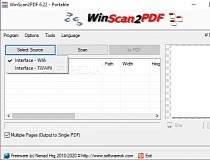
The WinScan2PDF application was developed to be a very small and portable program that allows you to scan documents and save them on your computer as a PDF by using any installed scanner.

Why WinScan2PDF:
Are you one of those who only occasionally has to send a signed document to someone by e-mail? So you don't need a PDF printer driver or some other complex program.

With WinScan2PDF it is no longer necessary! Simply save the scanned documents into PDF and save them to a file on your computer. The program is very simple to use.

Requirements:

· Scanner

What's New in This Release:

· Correction in WinScan2PDF for all Windows Server Systems and update of the languages files in WinScan2PDF


Program Informations
 Developer: Nenad Hrg.for
more visit free software


Size,Price and Added Date
22KB.Freeware.$0.00 to buy
10-08-2011


Download Links
WinScan2PDF 1.35.
Search here for more apps

Screenshot Keylogger 3.0.0.26

Recovery


Screenshot Keylogger is a key logger.

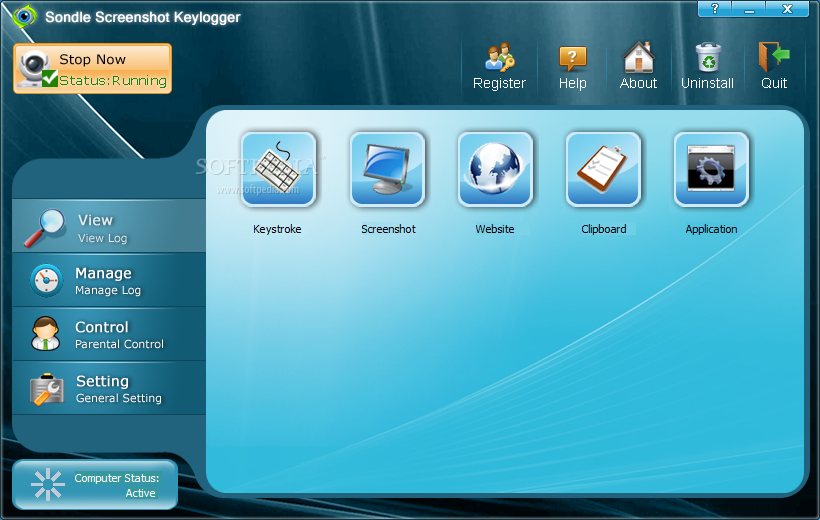
The Screenshot Keylogger application was developed to be an excellent key logger software. It is a valuable for parents wanting to monitor their kids' PC use. It logs keystrokes, clipboard, screenshot, applications and web sites.

Screenshot Keylogger runs hidden in the background and automatically logs all kinds of information.The interface can be password protected and only the person who knows the password can control the software.

Screenshot Keylogger can block any web sites effectively and easily by 'Web Site Black List', and it can block any application by 'Application Black List'. If you want to filter some web site you can add them to 'Web Site Black List', it can work with all kinds of Web browsers like Internet Explorer, Firefox, chorme and others.

Here are some key features of "Screenshot Keylogger":

· It logs all kinds of information, includes keystrokes, clipboard, screenshot, application and web sites, all in one.

· It runs hidden in the background and can not be terminated from task manager, it just can be exit from control pane of the Screenshot Keylogger.

· Password-protected, Only the person who knows the password can control the application.

· Web Site Black List can block any porn web sites or user-defined web sites, and it can work with any web browsers.

· Application Black List an block any Game Softwares or user-defined applications.

Limitations:

· 15 uses


Program Informations
 Developer: Sondle .for
more visit free software


Size,Price and Added Date
2MB.Demo / USD 39.95 to buy
10-08-2011


Download Links
Screenshot Keylogger 3.0.0.26.
Search here for more apps

Q-Dir Portable 4.69

Recovery


Incredibly small quad-pane file manager

Q-Dir is an extremely easy to use and small application designed for a better management of your files and folders. Fast and easy access, with an amazing Quadro-View technique. You don't have to renounce the usual, Drag and Drop, all Views, and other functions of your system.

No! Q-Dir gives you other nice functions, that make you happy. One can save many hand moves and also time!

Here are some key features of "Q-Dir Portable":

· Favorites: Quick access to most often used folders
· Drag and Drop: Move files by dragging in Q-views, and other programs such as MS Explorer
· Clipboard: Copy/Paste between the Q-Dir directory views, and other programs such as MS Explorer
· Folder-Type: ZIP-, FTP-, cabinet-, network-, system-folders, shortcuts
· Views: large icons, tiles, list, detail, thumbnail (Vista: extra large symbols)
· Export: to XLS, CSV, TXT, HTML
· Popup Menus: Desktop, My Computer
· Screen magnifier: anything on the screen can be enlarged
· Color Filter: Different colors for different item types (e.g. LOG, TXT)
· Highlight-Filter: Effective way for fast items highlighting
· File-Filter: Allows for quick and easy filtering of the items
· Columns: All columns support, and save function
· Quick-Links: For fast folder access
· Folder-Select: Fast and flexible folder selection address-bar/desktop menu/my-computer menu
· Multi-INI: Several INI files for Q-Dir
· Tree-View: Simple and quadruple
· Preview: Allows a quick preview

What's New in This Release:

· Corrections in the address bar classic and modern and the breadcrumb navigation!
· Update the Quad Explorer language files and optimization


Program Informations
 Developer: Nenad Hrg.for
more visit free software


Size,Price and Added Date
444KB.Freeware.$0.00 to buy
10-08-2011


Download Links
Q-Dir Portable 4.69.
Search here for more apps

Logon Screen 2.53

Recovery


Change the appearance of your logon screen

Logon Screen is a small and simple program that will help you change your Windows 7 logon screen background with a push of a button.

Changing the picture displayed when you log into your system is not an option Windows OS is ready for, but Logon Screen has been created for exactly this purpose. Logon Screen is one way to easily modify the background of the logon screen.

What's New in This Release:

· New language added: Indonesian.
· Updated Italian translation.
· Added Logon Screen in the Control Panel.
· Delete the old image when logon screen background is restored.
· Code improvements.

Reasons why this program is marked as ad-supported:

· Offers to download or install software or components that the program does not require to fully function


Program Informations
 Developer: Daniel Rebelo.for
more visit free software


Size,Price and Added Date
2MB.Freeware.$0.00 to buy
10-08-2011


Download Links
Logon Screen 2.53.
Search here for more apps

Q-Dir 4.69

Recovery


A really good file manager and explorer portable or installed

Q-Dir makes your files and folder easy to manage. Fast and easy access, with an amazing Quadruped-View technique. You don't have to renounce the usual, Drag and Drop, all Views, and other functions of your system. No!

Q-Dir gives you other nice functions, that make you happy. One can save many hand moves and also time! Q-Dir does not have to be installed and can be executed easily from the desktop. Rename Q-Dir_Installer.exe to Q-Dir.exe and GO. Q-Dir is a small famous utility for your operating system and also a USB-stick friend.

Here are some key features of "Q-Dir":

· Favorites: Quick access to most often used folders.
· Drag&Drop: Move files by dragging in Q-views, and other programs such as MS Explorer.
· Clipboard: Copy/ Paste between the Q-Dir directory views, and other programs such as MS Explorer.
· Folder-Type: ZIP-, FTP-,cabinet-,network-, system - folders, shortcuts ...
· Views: Large icons, tiles, list, detail, thumbnail (Vista: extra large symbols) .
· Export: to XLS, CSV, TXT, HTML.
· Popup Menus: Desktop, My Computer.
· Screen magnifier: anything on the screen can be enlarged.
· Color Filter: Different colors for different item types (e.g. *.log;*.txt).
· Highlight-Filter: Effective way for fast items highlighting.
· File-Filter: Allows for quick and easy filtering of the items.
· Columns: All columns support, and save function .
· Quick-Link's: For fast folder access.
· Folder-Select: Fast & flexible folder selection address-bar/ desktop menu/ my-computer menu/...
· Multi-INI: Several INI files for Q-Dir.
· Tree-View: Simple and quadruple.
· Preview: Allows a quick preview

What's New in This Release:

· Corrections in the address bar classic and modern and the breadcrumb navigation!
· Update the Quad Explorer language files and optimization


Program Informations
 Developer: Nenad Hrg.for
more visit free software


Size,Price and Added Date
450KB.Freeware.$0.00 to buy
10-08-2011


Download Links
Q-Dir 4.69.
Search here for more apps

Arcsoft TotalMedia Theatre 5.0.1.114

Recovery


Don't just watch movies - experience them!

ArcSoft TotalMedia Theatre is a high-quality media playback application that enhances your movie-viewing experience. It has a slick and intuitive user interface that makes it visually appealing to beginners and video enthusiasts alike.

In addition to basic DVD player functions, ArcSoft TotalMedia Theatre offers media and file format support for H.264/WMV-HD and BDMV/BDAV/BDJ/AVCHD.

Universal Player, including Blu-ray and HD DVD
In addition to playing commercial and homemade DVD movies, TotalMedia Theatre plays Blu-ray discs, AVCHDs, CDs, VCDs, and a variety of multimedia files, including QuickTime, RealPlayer, DVR-MS, WMV HD, and H.264 HD videos.

For HD DVD and Blu-ray, TotalMedia Theatre fully supports the entire specifications and can play back:
· Blu-ray movies (BDMV, BD Live), including all Hollywood movie discs, with full support for Java games and Internet interactivity
· HD DVD movies, including full support for user interaction and Internet interactivity through HDi
· Personal recorded BD-R/RE discs (BDAV)

Best Performance on High Definition (HD) Content Playback
ArcSoft TotalMedia Theatre supports playback of all three Blu-ray disc video formats: High Definition MPEG-2, AVC, and VC1's well as all kinds of other High Definition (HD) content: WMV HD, Quicktime HD, DivX HD, and H.264 HD. Support includes both 1280x720 (720p) and 1920x1080 (1080p). The smooth playback and excellent performance (lower CPU usage) make TotalMedia Theatre the obvious choice for your video-watching needs.

Next Generation Home Theatre
ArcSoft TotalMedia Theatre fully supports the next generation audio formats used in Blu-ray discs and HD DVDs: LPCM, AC-3, DD+, and MLP. Of course, it also supports Dolby Surround, Digital 5.1 (AC-3), and a virtual speaker mode. Once your favorite soundtracks are playing, fine-tune your audio experience with our broad 10-band equalizer. Pick from a variety of presets, or customize the sound to your personal taste.

Windows Media Center Edition Plug-in
The program comes with a Windows Media Center Edition plug-in built right in! The plug-in provides a "10 foot" user experience: big buttons and compatibility with your remote control mean you can use TotalMedia Theatre to watch your HD DVD and Blu-ray movies from the comfort of your couch.

HDCP Support
ArcSoft TotalMedia Theatre includes full support for High-Bandwidth Digital Content Protection (HDCP), a form of digital rights management. As part of its HDCP support, TotalMedia Theatre controls content over both DVI (Digital Visual Interface) and HDMI (High Definition Multimedia Interface) connections.

Watch AACS-Protected Discs
AACS (Advanced Access Content System) is the copy protection technology for Blu-ray and HD DVD. ArcSoft TotalMedia Theatre fully supports playback of AACS-protected discs.

Smart Stretch
Tired of those blank borders when you watch a 4x3 movie on a 16x9 screen? Smart Stretch intelligently stretches your videos with minimal distortion to fit across the entire display. The center of your movie stays proportioned while the stretching is limited to the far sides of the screen.

Auto Enhance Video
Intelligent, real-time color enhancing makes your movies look picture-perfect and vivid, frame after frame.

Time Stretch
On a flight and don't have time to finish a movie? Time Stretch lets you watch a two hour video in an hour without losing video and audio quality.

ArcSoft Virtual Speaker
The ArcSoft Virtual Speaker includes a speech booster, virtual surround module, and a fully customizable Smart Bass amplifier to turn an otherwise bland stereo or headphone sound source into an intense aural generator.

10-band Equalizer
Fine-tune your audio experience with a broad 10-band equalizer. Pick from a variety of presets, or customize the sound to your personal taste.

Floating Toolbar
Save your screen space for your movie, not your playback controls. Access common navigation commands while watching a full-screen movie without using the main control panel.

ArcSoft TotalMedia Theatre will offer you a unique experience in watching movies!

Here are some key features of "ArcSoft TotalMedia Theatre Platinum":

Full support to play:
· Blu-ray (BDMV, BDAV, BD-Java),
· HD DVD, AVCHD, DVD, VCD, CD
· High definition interactive content, including HDi and BD-Java
· High definition multimedia files: QuickTime, RealPlayer, DVR-MS, WMV HD, DivX HD, H.264 HD
Advanced video decoding:
· MPEG-1
· MPEG-2
· MPEG-4
· VC1 (SMPTE 421M)
· H.264 HD
· Support for music playback: CDs, MP3 CDs, and other music discs
· Region code setting
· AACS support for HD DVD and Blu-ray
· Parental control
· Smart Stretch
· Time Stretch
· Auto Enhance
· Screen capture
· Auto-resume play
· Playlist creation
· Easy to use: pop-up menu, shortcut keys for playback actions

Requirements:

· For TotalMedia Theatre with DVD playback:
· Intel Pentium 4, Pentium M, or equivalent; AMD Athlon 64 or equivalent
· 24 MB free hard disk space
· 128 MB RAM (256 MB recommended)
· DVD-ROM drive
· 16-bit color display at 800x600
· DirectX 9.0c
· For TotalMedia Theatre with Blu-ray and HD DVD playback:
· Intel Pentium EE 3.2 GHz, Intel Core Duo, or equivalent; AMD Athlon 64 or equivalent
· 120 MB free hard disk space
· 512 MB RAM (1 GB recommended)
· Blu-ray or HD DVD drive
· NVIDIA GeForce 8400 and above, or AMD(ATI) HD2400 and above.
· 256 MB graphics card or above
· HDCP compliant display for digital output (HDMI connection); TV or VGA monitor for analog output

Limitations:

· 15 days trial
· Nag screen

What's New in This Release:

· Plays Blu-ray 3D movies and watch 2D DVD movies in 3D in real-time
· Includes a powerful Media Manager to help you organize and search for videos easily and quickly
· Newly improved SimHD supports De-Noise, Dynamic Lighting and increased frame-rate conversion
· Provides a Smart Menu so you can view detailed information about the currently playing DVD or video file without interrupting playback
· Includes online video streaming directly from popular streaming websites
· Redesigned elegant Audio/Video Center and intuitive user interface
· Supports 3D formats: JPS, MPO
· Supports MPEG-4 ASP files
· Supports external subtitle files: SRT, SMI, SSA, IDX, and SUB
· Supports video formats: AVS, WTV, MKV (with multiple audio tracks and subtitles)
· Supports audio formats: ALAC, wmal, APE, FLAC, LPAC, OFR

TAGS: media player | Blu-ray player | video player | player | Blu-ray | HD


Program Informations
 Developer: ArcSoft Inc.for
more visit free software


Size,Price and Added Date
61MB.Trial / USD 99.99 to buy
10-08-2011


Download Links
Arcsoft TotalMedia Theatre 5.0.1.114.
Search here for more apps

Leawo 3GP Converter Pro 4.1.0.0

Recovery


Leawo 3GP Converter is a powerful and totally excellent 3GP Converter. Enjoy the easy-to-use converter which can rip and convert videos to 3GP, 3G2 formats for playback on mobiles like Nokia N810, Sony Ericsson W800i, LG Shine KU970, etc.

Features:

*Converts video to 3GP: MPEG to 3GP, WMV to 3GP, AVI to 3GP, MP4 to 3GP, AVI to 3G2, MP4 to 3G2, etc.
*Allow enjoying video on portable players: video on 3GP and 3G2 cell phones.
*Convert video to audio file: video to mp3, video to aac, video to m4a, etc.
*Trim video to retain a short duration.
*Crop video to Extract the video black margins.
*Adjust output effects: video brightness and contrast, audio volume.
*Better output video quality.
*Support Batch video to 3GP and video to 3G2 conversion
*Merge all added video and convert into a larger 3GP or 3G2 file for playing on phone.
*Capture beautiful thumbnails to set as Wallpaper.
*User-friendly and easy-to-use interface.
*Fast conversion speed and excellent output quality.
*No machine performance requirement for video conversion. you can free download Leawo 3GP Converter Pro 4.1.0.0 now.


Program Informations
 Developer: Leawo Software Co., Ltd.for
more visit free software


Size,Price and Added Date
14MB.Shareware $24.95 to buy
10-08-2011


Download Links
Leawo 3GP Converter Pro 4.1.0.0.
Search here for more apps

CPUId 1.0.0.1

Recovery


CPUId is a program that displays some processor related (CPU) information. you can free download CPUId 1.0.0.1 now.


Program Informations
 Developer: Softspecialists.for
more visit free software


Size,Price and Added Date
29KB.Freeware.$0.00 to buy
10-08-2011


Download Links
CPUId 1.0.0.1.
Search here for more apps

Adware.EZSearch.B Removal Tool

Recovery


Adware.EzSearch.B Removal Tool will find and fully remove Adware.EZSearch.B and all problems associated with Adware.EZSearch.B virus.

Fast, easy, and handy, Adware.EZSearch.B Removal Tool protects your computer against Adware.EZSearch.B that does harm to your computer and breaks your Privacy. Adware.EZSearch.B Removal Tool scans your hard disks and registry and destroys any manifestation of Adware.EZSearch.B. Standard anti-virus software can do nothing against malicious programs like Adware.EZSearch.B. Remove Adware.EZSearch.B Straight away! you can free download Adware.EZSearch.B Removal Tool now.


Program Informations
 Developer: Security Stronghold.for
more visit free software


Size,Price and Added Date
20MB.Shareware.$N/A to buy
10-08-2011


Download Links
Adware.EZSearch.B Removal Tool.
Search here for more apps

W32/CleanAntiAv Trojan Removal Tool 1.0

Recovery


Editor: cleanantiav.exe will Detect and remove W32/CleanAntiAv Trojan completely, from your system. Download the cleanantiav.exe and save it in a temporary directory. Double click on cleanantiav.exe to execute it. Follow the user-friendly instructions to detect and remove the W32/CleanAntiAv Trojan from your computer. you can free download W32/CleanAntiAv Trojan Removal Tool 1.0 now.

clean | cure | utility | cleanantiav | W32/CleanAntiAv | CleanAntiAv Trojan


Program Informations
 Developer: Proland Software.for
more visit free software


Size,Price and Added Date
0.5MB.Freeware.$0.00 to buy
10-08-2011


Download Links
W32/CleanAntiAv Trojan Removal Tool 1.0.
Search here for more apps

Ultimate Boot CD 5.1.1

Recovery


Run flerver are just a few of the tools fouM drives

You need the Ultimate Boot CD if you want to Run floppy-based diagnostic utilities from CDROM drives, Free yourself from the slow loading speed of the floppy drive, or Consolidate as many diagnostic programs as possible into one bootable CD. Give Ultimate Boot CD a try to fully assess its capabilities!

You need the Ultimate Boot CD if you want to:

- Run floppy-based diagnostic tools from CDROM drives. More and more PCs are shipped without floppy drives these days, and it is such a royal pain when you need to run diagnostic tools on them.

- Free yourself from the slow loading speed of the floppy drive. Even if you do have a floppy drive, it is still much much faster to run your diagnostic tools from the CDROM drive, rather than wait for the tool to load from the floppy drive.

- Consolidate as many diagnostic tools as possible into one bootable CD. Wouldn't you like to avoid digging into the dusty box to look for the right floppy disk, but simply run them all from a single CD? Then the Ultimate Boot CD is for you!

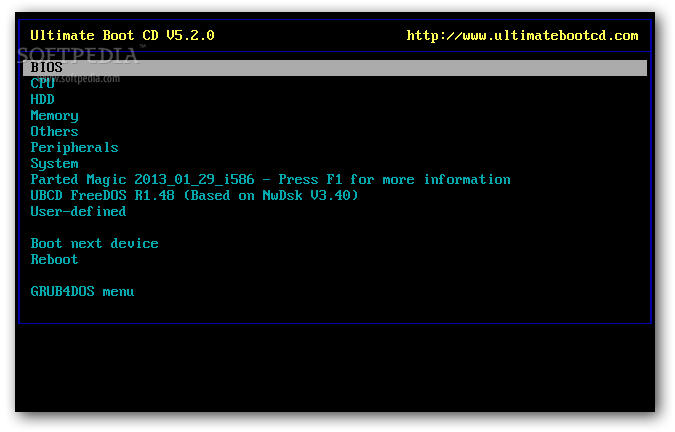
- When you boot up from the CD, a text-based menu will be displayed, and you will be able to select the tool you want to run. The selected tool actually boots off a virtual floppy disk created in memory.

What's New in This Release:

· Updated Parted Magic to V6.6.


Program Informations
 Developer: Victor.for
more visit free software


Size,Price and Added Date
360MB.Freeware.$0.00 to buy
10-08-2011


Download Links
Ultimate Boot CD 5.1.1.
Search here for more apps